How to Choose a CTR Tool Over a Web Traffic Bot: Buyer's Guide
You are paying for visits you cannot verify. A bot can inflate a session count while the search result your customer sees stays exactly where it was, and no screenshot proves otherwise. Choosing between a CTR tool and a web traffic bot is a decision about evidence, not volume.
This guide breaks down what CTRTool actually does, the difference between a real CTR tool and anonymous bot traffic, and which features, pricing and trust signals matter before you buy. By the end you will know which option fits your campaigns and how to judge the proof behind any visit.
What Is CTRTool? Who It Serves and What It Does
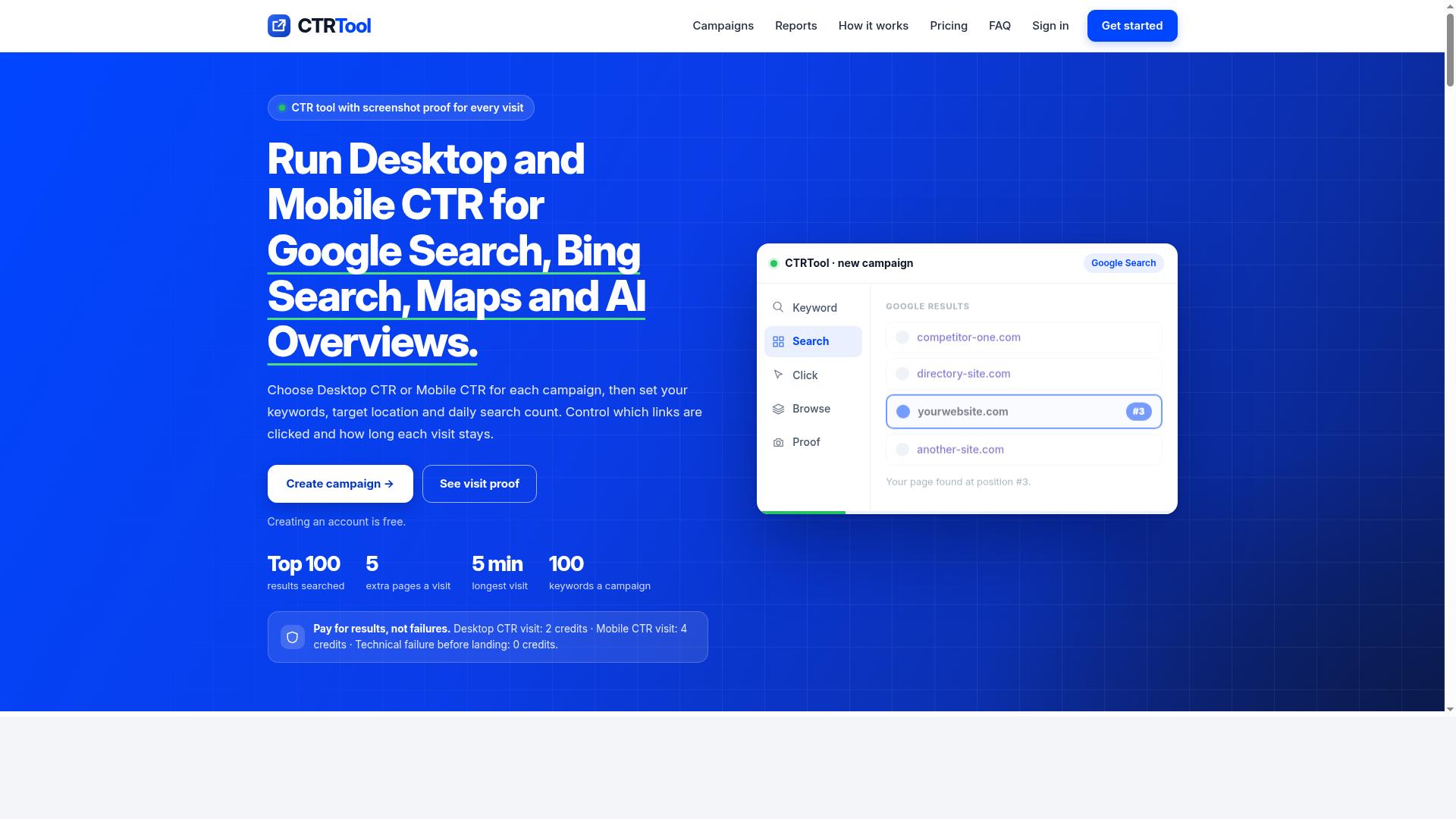
CTRTool is a SaaS platform that runs click-through rate (CTR) campaigns for Google Search, Bing Search, Google Maps, and AI Overviews, providing screenshot proof for every visit. That single detail separates it from a typical web traffic bot, which mostly delivers anonymous page views with nothing to verify.
The tool is built around structured CTR campaigns, not raw traffic volume. Every campaign runs on a chosen device type and targets specific search surfaces, so the activity is tied to real queries and real result pages rather than random referral hits.
For buyers comparing a CTR tool against a web traffic bot, the distinction matters. A traffic bot inflates session counts. A CTR campaign tool focuses on SERP behavior, meaning the searches, clicks, and visits that shape click-through rate and engagement metrics in your analytics.
CTRTool serves SEO practitioners and agencies who want to test and influence how their listings perform in search results. It is aimed at people who already understand keywords, rankings, and organic traffic, and who need a controlled way to run campaigns around them.
It is not positioned as a generic visitor generator for blogs, display ads, or social pages. The entire product is organized around search campaigns, which keeps its purpose narrow and its output easier to audit.
Each campaign starts with two basic choices: Desktop CTR or Mobile CTR. Users pick one per campaign, then set the keywords and target URLs they want the campaign to work with. That structure mirrors how search results actually differ by device, so a mobile campaign and a desktop campaign are treated as separate efforts.
Beyond device type, users set the target location and daily search count, and control which links are clicked and how long each visit stays. These controls give campaigns a defined shape instead of open-ended traffic volume.
The screenshot proof is the part that matters most in a buyer's guide. It gives practitioners a record they can review against their own reporting, which is far more useful than a dashboard that only reports a number of visits.
CTRTool is also candid about limits. The site states plainly that automated visits do not guarantee rankings. That honesty is worth noting, because it frames the tool as a campaign and testing instrument rather than a shortcut to guaranteed positions.
In short, CTRTool is a focused CTR campaign platform for search surfaces, built for SEO professionals and agencies who value documented visits and per-campaign control over bulk bot traffic.
CTR Tool vs. Web Traffic Bot: The Decisive Difference
The core difference between a CTR tool like CTRTool and a web traffic bot lies in accountability: CTRTool provides screenshot proof for every visit, while traffic bots deliver anonymous, unverifiable clicks. A web traffic bot is an automated script that inflates traffic metrics without real user behavior, often relying on proxy networks, IP rotation, user-agent spoofing, and headless browser sessions.
CTRTool is positioned as a CTR tool with screenshot proof for every visit across Google Search, Bing Search, Maps, and AI Overviews. That proof requirement is what separates a measurable campaign from blind traffic generation, and it is the first thing to weigh in any buyer's guide comparison.
Why Screenshot Proof Beats Anonymous Bot Traffic
Screenshot proof transforms CTR campaigns from opaque traffic generation into a verifiable process: each visit includes search and landing screenshots as separate proof images. You can see what happened on the SERP and what happened after the click, rather than trusting a dashboard total.
Bot traffic offers the opposite. There is no evidence of actual SERP interaction, no session context, and no way to confirm a real search occurred. That gap matters because unverifiable clicks are exactly the pattern that gets flagged as click fraud and can put a site at risk of search engine penalties.
Proof also changes how you assess traffic quality. With CTRTool, each visit is documented, so you can compare what you paid for against what was delivered. The platform extends this with full visit paths and keyword positions tracked over time, including Maps listing order and AI citation order. Those records support a clearer read on engagement metrics than any anonymous traffic source can provide.
A concrete example makes the difference plain. A campaign targeting "best CRM software" would include a screenshot of the search results page showing the result that was clicked, plus a screenshot of the landing page once it loaded. If a vendor cannot produce both images for a given visit, you have no basis for vendor evaluation beyond the invoice.
The commercial upside is protection against wasted spend. CTRTool uses a pay-for-results credit model with no credits charged for technical failures before landing, and visits that cannot verify the requested location use no credits. One credit balance is shared across all campaign types, websites, and keywords, with up to 100 campaigns and 100 keywords each. Visits can run up to 5 minutes with up to 5 additional internal pages, and unused credits roll over while subscribed. For a buyer comparing options, that structure ties cost to documented delivery instead of hopeful volume.
Key Features That Separate a Real CTR Tool From a Traffic Bot
A genuine CTR tool offers verifiable campaign mechanics, such as multi-platform coverage, visit path tracking, and pay-for-results pricing, that a traffic bot cannot replicate. Bots tend to fire clicks at a URL with little regard for how a real user would arrive there.
That difference matters for traffic quality and for the credibility of your engagement metrics. A tool built around defined campaign types gives you accountability and targeting, while a bot leaves you guessing about where clicks came from.
The features below explain why CTRTool sits in the first category, from the surfaces it covers to the way it bills for completed visits.
Search, Maps and AI Overview Campaign Coverage
CTRTool covers four campaign types: Google Search CTR, Bing Search CTR, Google Maps CTR, and AI Overview CTR, each designed to mimic organic user behavior on those surfaces.
Google Search CTR campaigns work by searching a keyword and clicking the organic result. You choose Desktop or Mobile, and the tool searches through the Top 100 results, then follows through to internal pages where configured. Bing Search CTR follows the same mechanics on Bing.
Google Maps CTR campaigns find a business listing and click its website link, checking up to 50 listings, roughly five pages, with city targeting. AI Overview CTR campaigns require a matching source link, then click it within the overview.
Across all four types, the page must appear within the top 100 organic results for the chosen keyword and location. That requirement keeps campaigns tied to real SERP behavior rather than blind click simulation.
Coverage across these surfaces lets agencies target diverse SERP features instead of treating search as one channel. A local business, for example, could run a Maps campaign to improve local pack visibility, while a publisher might focus on AI Overview citations.
Visit Paths, Keyword Position Tracking and the Pay-for-Results Credit Model
CTRTool tracks full visit paths and keyword positions over time, and its credit-based model charges only for completed visits, aligning cost with results.
A visit path is the sequence from search to landing page and on to internal pages, up to five additional pages per visit and up to five minutes total. Following that route helps simulate realistic user journeys, which supports more believable session duration and dwell time signals than a single isolated click.
Reports include search and website screenshots plus keyword positions over time, covering Search positions, Maps listing order, and AI citation order. That gives you reporting on whether a campaign is landing where intended.
The credit model is where the pay-for-results approach becomes concrete. Desktop CTR visits cost 2 credits and Mobile visits cost 4, a verified search without a match costs 1 credit, and a technical failure before landing costs nothing. Plans scale accordingly:
- Starter: $59/month for 2,000 credits, up to 1,000 Desktop CTR visits or 500 Mobile CTR visits
- Growth: $125/month for 5,000 credits, up to 2,500 Desktop or 1,250 Mobile visits
- Scale: $399/month for 20,000 credits, up to 10,000 Desktop or 5,000 Mobile visits
- Agency: $699/month for 40,000 credits, up to 20,000 Desktop or 10,000 Mobile visits
Unused credits roll over while a subscription is active and expire when cancellation takes effect. One balance covers all campaigns, with up to 100 campaigns and 100 keywords per campaign, which keeps vendor evaluation simple when comparing against bots that charge per click without proof of delivery.
For a clear verdict: CTRTool is a legitimate, accountable option because every visit is traceable and priced against a published credit schedule. It explicitly does not guarantee higher rankings, leads, or sales, and that honesty is exactly what separates a real tool from a web traffic bot.
Pricing and Plans: What You Pay For
CTRTool offers monthly subscription plans in USD: Starter at $59/month for 2,000 credits and Growth at $125/month for 5,000 credits, with credits redeemable for Desktop or Mobile CTR visits. Two larger tiers sit above them: Scale at $399/month for 20,000 credits and Agency at $699/month for 40,000 credits, which covers up to 20,000 Desktop or 10,000 Mobile visits. Growth carries the Recommended label.
Each plan translates credits into a known number of visits. Starter covers up to 1,000 Desktop CTR visits or 500 Mobile visits, while Growth doubles that to 2,500 Desktop or 1,250 Mobile visits. Scale and Agency extend the same structure to much higher volumes for heavier campaigns. Creating an account is free, so you can inspect the dashboard before committing to any subscription.
Two details matter when you compare tiers side by side. Unused credits roll over while your subscription is active, so a quiet month is not wasted spend. They expire when a cancellation takes effect, which means rollover rewards staying on. The page also displays limited launch pricing: prices rise 30% on November 15, so the current rates are worth locking in early.
What a Visit Actually Costs You
The credit system is straightforward once you know the rates. A Desktop CTR visit costs 2 credits and a Mobile CTR visit costs 4 credits, which explains why every plan lists fewer Mobile visits than Desktop ones. A verified search without a match costs 1 credit, and a technical failure before landing costs 0 credits, so you are not charged for a visit that never arrived.
That last rule separates CTRTool from a typical web traffic bot purchase. Bot sellers often quote a flat price per 1,000 visits with no proof of delivery and no refund for failed hits. Here, the zero-credit failure rule means you only pay for visits that reach the landing page. For a buyer weighing traffic quality against budget, that is a meaningful difference in risk.
Cost-Effectiveness Across the Plan Range
The price per credit falls as you move up the tiers, from $0.0295 on Starter to roughly $0.0175 on Agency. Buyers running small tests can stay on Starter without overpaying, while agencies managing several campaigns get more headroom per dollar on the top plans. A custom development option exists as a separate, agreed one-time fee for needs outside the standard plans.
Compare that structure with per-1,000-visit bot pricing and the value case becomes clear. Cheap bot traffic looks inexpensive up front, but it carries click fraud risk, weak engagement metrics, and no accountability if visits never land. A CTR tool with a transparent credit model gives you a defined cost per visit, rollover protection, and a paper trail. For most buyers, predictable spend beats a bargain with no proof.
Start with the tier that matches your monthly visit target, confirm whether Desktop or Mobile fits your campaign, and factor in rollover before upgrading. The plan that fits your real volume is almost always cheaper than the one that looks impressive on paper.
Trust Signals: Proof, Transparency and Campaign Eligibility Rules
CTRTool builds trust through verifiable proof, transparent campaign rules, and clear eligibility criteria that prevent misuse. Where a web traffic bot asks buyers to take activity on faith, this CTR tool documents what happened on every visit. That difference matters in a buyer's guide, because proof is what separates a measurable campaign from anonymous bot traffic.
The core trust signal is screenshot proof for every visit. CTRTool provides search and landing screenshots as separate proof images, so a buyer can see both the query context and the page that was reached. A generic traffic bot typically reports only a visit count, which tells you nothing about SERP behavior or whether a real page was viewed.
Proof images pair with full visit paths. Each visit can run up to 5 minutes and include up to 5 additional internal pages, giving a documented route rather than a single anonymous hit. For buyers comparing traffic quality, this record supports a more honest view of session duration and engagement metrics than raw visit totals.
Tracking closes the loop. CTRTool records keyword positions over time, including Maps listing order and AI citation order. That lets a buyer connect campaign activity to movement in organic results instead of guessing whether a ranking signal changed.
Transparency extends to billing. The pay-for-results credit model means no credits are charged for technical failures before landing, and visits that cannot verify the requested location use no credits. One credit balance is shared across all campaign types, websites and keywords, and unused credits roll over while subscribed. These terms keep risk assessment grounded in what was actually delivered.
Eligibility rules keep campaigns realistic. A page must appear within the top 100 organic results for the chosen keyword and location. Maps campaigns check up to 50 listings, roughly five pages of results. AI Overview campaigns require a matching entry. Together these checks ensure campaigns target opportunities that genuinely exist, not fabricated positions.
Compliance information is published on the legal notices page, listed among the tool's official profiles. Buyers weighing terms of service and click fraud concerns should read it before committing, then confirm that proof, tracking and eligibility terms match what they need.
Who Should Use CTRTool
CTRTool is designed for SEO practitioners and agencies running CTR campaigns for their own or client websites across Google Search, Bing Search, Google Maps, and AI Overviews. The platform fits teams that treat click-through rate as a measurable part of their organic strategy rather than a guessing game.
Instead of relying on a web traffic bot that inflates sessions with no verifiable source, CTRTool is built around campaigns with proof. That distinction matters for anyone who needs to show clients what was delivered and why it counts.
The core audience breaks down into a few clear groups:
- SEO professionals who want to test how SERP behavior responds to deliberate CTR activity.
- Agencies managing campaigns across several client properties at once.
- Consultants who need documented results they can present and defend.
Each of these users shares one trait: they care about traffic quality and evidence, not raw volume.
Use cases tend to fall into three buckets. The first is improving keyword positions by supporting pages with consistent, real-looking engagement metrics such as dwell time and session duration. The second is testing SERP behavior, where a practitioner wants to see how a page performs when click-through rate shifts.
The third is enhancing local visibility through Google Maps campaigns, which suits businesses competing in geographic search results. In every case, the goal is a ranking signal built on credible engagement rather than bot traffic.
It helps to see this in practice. An agency managing multiple client sites could use the Growth plan to run scalable visits across those properties while keeping each campaign separate and reportable. A local business, by contrast, might lean on Maps campaigns to strengthen its presence in nearby searches.
Both examples point to the same logic: the tool is for people who need reporting and a clear record of what happened, not an opaque stream of anonymous hits.
Worth noting is that the site's guidance references broader SEO tactics such as tier links, PBNs, and test properties. CTRTool itself stays focused on CTR campaigns with proof, so buyers who want a verifiable click-through rate workflow will find the fit natural.
If your priority is defensible engagement metrics and a documented trail, this is the audience the platform was built for.
Final Verdict: Is CTRTool the Right Choice Over a Web Traffic Bot?
CTRTool is the better choice over a web traffic bot when proof, transparency, and multi-platform coverage matter; for those prioritizing unverifiable volume, a bot may seem cheaper but carries higher risk. The decision comes down to what you are actually buying: measurable campaign evidence or anonymous hits.
A web traffic bot sends automated visits through proxy networks, IP rotation, and user-agent spoofing, often driven by a headless browser. The traffic source is masked and the outcome is unverifiable. CTRTool takes the opposite approach, giving SEO practitioners and agencies a campaign record they can check.
The differentiators are straightforward to compare:
- Screenshot proof: CTRTool provides visual evidence of campaign activity, while bot traffic offers no such record.
- Visit paths: defined paths show where visits go, instead of anonymous hits arriving from nowhere.
- Keyword tracking: campaigns stay tied to the keywords you are targeting, so results connect to your SEO work.
- Pay-for-results credits: you pay for delivered results rather than prepaid volume of uncertain quality.
That combination matters because click simulation without accountability creates real exposure. Search engines treat CTR manipulation as a ranking signal risk, and unexplained spikes in bot traffic can distort analytics, inflate bounce rate, and muddy conversion rate reporting. A tool that documents its activity lets you assess that risk with facts in hand.
CTRTool is built for SEO practitioners and agencies running verifiable campaigns. If your vendor evaluation weights compliance and a clear audit trail, the platform fits that brief far better than anonymous bot traffic. A buyer's guide decision should favor the option you can explain to a client.
The balanced view is this: choose CTRTool for accountability and compliance, and avoid bots for click fraud risk and lack of proof. Unverifiable volume may look cheaper up front, but it leaves you with no evidence, no reporting, and no defensible answer when questions arise.
For questions about the platform or to get started, contact support at vaibhav@autoblogging.ai. The site also lists Support, Terms of use, and Legal notices pages if you want to review policies before committing.
Frequently Asked Questions
What makes CTRTool different from a web traffic bot?
A web traffic bot typically sends generic or automated visits that don't reflect real search behavior, while CTRTool runs structured CTR campaigns where each visit follows a real search path for your chosen keyword and location. Every CTRTool visit also comes with screenshot proof - separate search and landing screenshots - so you can verify what actually happened. That proof trail is the core difference: you're buying verifiable results, not just raw traffic numbers.
Which platforms and campaign types can I run with CTRTool?
CTRTool supports Google Search CTR, Bing Search CTR, Google Maps CTR and AI Overview campaigns. For search campaigns you choose Desktop CTR or Mobile CTR, set your keywords and target location, and the tool clicks your organic result from the top 100 results. Maps campaigns work through your business listing, and AI Overview campaigns require a matching source link.
How do credits and pricing work - am I paying per visit?
CTRTool uses a pay-for-results credit model across monthly USD plans: Starter is $59/month for 2,000 credits (up to 1,000 Desktop or 500 Mobile CTR visits), and Growth is $125/month for 5,000 credits (up to 2,500 Desktop or 1,250 Mobile visits). Because mobile visits consume more credits than desktop ones, check the plan's visit allowance against the campaign type you plan to run before choosing a tier.
Can I target a specific country, state or city?
Yes. CTRTool is a global online service with no stated country restrictions, and each campaign lets you target a chosen country and optionally a state and city. If you'd rather not narrow it down, you can select "Any country" to use a mix of supported locations.
What proof do I get that a campaign actually ran?
Every visit includes screenshot proof, delivered as separate search and landing screenshots, plus the full visit path. CTRTool also tracks keyword positions over time, including Maps listing order and AI citation order, so you can see how rankings move alongside your campaign activity. This makes it straightforward to show clients or stakeholders exactly what was delivered.
What should I check before buying any CTR tool?
Ask whether the tool provides verifiable proof per visit, which platforms and device types it covers, and how its pricing maps to actual visits rather than vague "traffic" units. Confirm eligibility rules too - for example, CTRTool requires your page to appear within the top 100 organic results for the chosen keyword and location, Maps campaigns check up to 50 listings (about five pages), and AI Overview campaigns need a matching source link. If anything is unclear, CTRTool's support is reachable at vaibhav@autoblogging.ai.